QuickDoc: PDF Reader Tools
Dev GlobegTools
4.5323.00 Reviews
- Version
- 1.2.4
- Installs
- 1.00M
- Age Rating
- Everyone
Screenshots
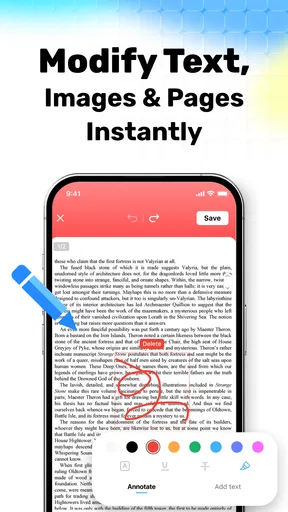
Our Review of QuickDoc: PDF Reader Tools
 Analysis by Appyee
I approached QuickDoc: PDF Reader Tools as the kind of utility I would keep installed for those small document jobs that interrupt an ordinary day: opening a PDF from a message, checking a page before sending it on, or finding a particular section without reaching for a laptop. Its focus is clear from the name, and its appeal is equally straightforward: it is a free tools app from Dev Globeg that aims to make PDF work feel less like a chore on a phone.
My overall impression is positive, but I would describe it as a practical companion rather than a complete replacement for a desktop document suite. The store summary calls it powerful and easy to use, and the 4.5 average from around eleven thousand ratings suggests that many people find the basic experience dependable. I can understand that reaction. The app is most convincing when I need quick access and a simple path through a document, not when I expect an advanced office workflow.
How QuickDoc fits into everyday PDF use
The strongest reason to try it is convenience. PDFs are often treated as finished files, yet on a phone they can still be awkward: a document arrives in a chat, a form needs checking, or a reference file is buried among downloads. A focused reader reduces the number of steps between receiving that file and actually understanding it. In my experience, that narrow purpose is more valuable than a crowded interface filled with tools I may never touch.
The app belongs in the tools category, and that is the right way to think about it. I would not install it expecting a full writing, spreadsheet, or cloud-storage environment. I would install it because I want a dedicated place for PDF reading and related document tasks. That distinction matters for expectations: the app can be useful precisely because it does not need to pretend to be an entire office.
A realistic example is preparing for an appointment. I might receive a multi-page document by email, open it on my phone while travelling, scan the headings, and check a particular page before the meeting. With a reader built around that moment, I am less likely to download several unrelated apps or open a browser tab that loses the file among other pages. QuickDoc makes the most sense in these short, repeatable situations.
It is also a reasonable choice for students, freelancers, and anyone who handles instructions or reference material away from a desk. A student can use it to review a handout between classes; a freelancer can inspect a client document before replying; a family member can open a manual or official form without needing technical knowledge. The Everyone age rating also makes it approachable for a broad household audience, although ease of use still depends on how comfortable each person is with Android file handling.
The current experience and its practical strengths
What I value most in a PDF reader is not a long feature checklist. I want documents to open without confusion, pages to remain readable on a smaller screen, and the controls to stay out of the way until I need them. QuickDoc’s positioning points toward that kind of direct experience. The short store description is simply “QuickDoc,” which says little by itself, but the product name and tools classification make the intended use immediately understandable.
One useful habit is to treat the app as a first-pass document station. I open a file, identify whether it is the right version, skim its structure, and decide what needs deeper attention. This prevents a common mistake with mobile PDFs: trying to perform every possible action before first understanding the document. For quick checks, a focused reader can be faster than a more elaborate alternative that presents too many choices at launch.
Another practical tip is to keep the original file untouched when a document matters. I use the reader for inspection first, then return to the source location if I need to share or manage the file elsewhere. That workflow separates reading from file administration and reduces the chance of confusing a temporary download with the authoritative copy. It is a small distinction, but it becomes important when several revisions have similar names.
The app’s free price lowers the barrier to testing it. I can see why that matters for someone who only occasionally handles PDFs and does not want to commit to a subscription-based document service. It also makes QuickDoc easier to recommend as a secondary reader alongside an existing productivity setup. If it handles the everyday files I receive, I gain convenience without having to reorganize every document habit around it.
Its reach is already substantial, with over a million installs, so it is not an obscure experiment with no visible audience. That does not guarantee that it will suit every workflow, but it does make the app feel like a realistic option for people comparing mobile readers. The rating activity, including around three hundred reviews, gives prospective users more community feedback to consider than a brand-new utility would normally have.
What the current version tells me about its direction
The current version is 1.2.4, and the app was released on August 26, 2025. Those details place it in an early stage of its product life rather than a long-established document platform with years of accumulated complexity. I see that as both an opportunity and a reason to stay measured. A relatively young app can feel cleaner because it has fewer layers, but it may also still be refining the edge cases that experienced PDF users notice first.
I would not read the version number as proof of a specific new capability. Without a detailed change history, it is more responsible to judge the present release by how well it serves its central purpose and to treat future expansion as something to watch rather than something already delivered. The important point for a new user is that the app is actively presented as a current utility, not an abandoned reader left behind after an initial launch.
For existing users, a newer release can be valuable even when the visible interface looks familiar. Small improvements in opening documents, handling unusual pages, or keeping navigation understandable can matter more than a dramatic redesign. I would pay attention to whether updates preserve the app’s directness. A PDF tool becomes less useful if every revision adds layers that slow down the simple task of opening and reading a file.
My advice to someone upgrading or installing now is to test the version with the documents they actually use. A plain text PDF, a long reference document, and a file with a more complicated layout can reveal different strengths. This is more informative than judging the app only with one ideal sample. It also helps clarify whether QuickDoc should become the main reader or remain a convenient backup for quick access.
Where it compares well with familiar alternatives
The usual alternatives fall into several groups. There are browser-based viewers, general file managers, office suites, and established PDF ecosystems that combine reading with editing, cloud synchronization, signing, and collaboration. Those options can be better when documents are part of a larger professional process. They may also be preferable if I already store everything in one integrated service and do not want another app involved.
QuickDoc’s advantage is focus. A general office app may be powerful, but that power often comes with more menus, account decisions, and unrelated functions. A browser viewer is convenient for a file already online, yet less appealing when I simply want to open a local document. A dedicated tools app can occupy the middle ground: more intentional than a browser, less imposing than a full office platform.
The trade-off is equally clear. If I need advanced editing, formal document signing, collaborative review, or a carefully managed business archive, I would choose a specialist or an established office service instead. QuickDoc is easier to recommend for reading and quick document handling than for a workflow where auditability, shared access, or extensive authoring controls are central. Choosing the smaller tool is sensible only when its smaller scope matches the job.
There is also a privacy consideration in everyday use, even without making assumptions about the app’s policies. I would be cautious with confidential documents until I had personally reviewed the app’s behavior and settings on my device. For ordinary public forms or reference material, that may not be a concern. For financial, medical, or workplace files, I would use the option that best fits my organization’s rules, especially if an approved document platform is already required.
Small workflows that make the app more useful
My first recommended workflow is a “read, locate, verify” routine. I open the document, locate the relevant section, and verify the page or wording before acting on it. This is particularly useful for travel instructions, appointment paperwork, product manuals, and school documents where a single overlooked line can create confusion. The value is not a flashy feature; it is using a reader deliberately instead of treating the PDF as an image to scroll past.
My second tip is to create a temporary review queue outside the app. When several PDFs arrive in one day, I note which ones need action and which are only for reference. QuickDoc can then serve as the inspection point, while my normal file organization remains separate. This avoids turning the reader into an accidental archive and makes it easier to return to the important files later.
A third insight is to compare the app with your phone’s default behavior before fully switching. Open the same few documents in both places and notice which path feels clearer for your routine. If QuickDoc saves steps when opening files from downloads or messages, it earns a permanent place. If the default viewer already handles everything you need, installing another reader may add clutter rather than value. The free price makes this comparison easy, but it does not remove the cost of extra icons and another app to maintain.
I would also test documents with different reading demands rather than judging only a short, clean file. A compact form, a long report, and a document with dense pages can expose whether navigation remains comfortable for you. This is a useful decision rule because “PDF reader” covers many layouts. An app that feels excellent for quick forms may not be the best choice for extended technical reading, and personal screen size and eyesight make a real difference.
Who should use it, and who should look elsewhere
I would recommend QuickDoc to someone who wants a free, approachable PDF utility for everyday reading and quick checks. It is especially suitable if you regularly receive documents through messages or email and want a dedicated tool instead of relying on whichever app happens to open the file. The Everyone rating supports its broad positioning, while the current release and large install base make it easy to consider as a mainstream option rather than a niche experiment.
I would be more cautious about recommending it as the only document app for a professional who edits PDFs all day. Heavy users often need a complete chain from creation to revision, signing, sharing, and storage. In that situation, a more specialized service may justify its extra complexity. The same applies to teams that require centralized document control. QuickDoc’s appeal is strongest when the task is personal, immediate, and focused on accessing a PDF rather than managing an entire document operation.
Someone who dislikes installing separate utilities may also prefer to stay with a familiar office suite. The best reader is the one that fits the way files already arrive and are stored. QuickDoc can simplify the reading step, but it cannot by itself decide where a file belongs, which copy is final, or how a team should collaborate. Those decisions remain part of the surrounding phone and work habits.
What I would watch as the app develops
Because the app is still relatively young, I would watch whether future releases deepen usefulness without losing the clean, direct purpose that makes it attractive. Improvements should ideally make common document moments smoother: opening a file from different sources, moving through a long document, and returning to the right place later. I would also look for clearer communication around updates so users can understand whether a release changes reading behavior or simply maintains compatibility.
I would pay attention to how well the app handles the boundary between reading and document management. Many users begin with simple viewing and later want more control. If QuickDoc expands, the challenge will be adding useful tools without turning a quick reader into a crowded office suite. If it stays focused, it should continue to explain its value through speed and simplicity rather than trying to compete feature for feature with much larger platforms.
For now, I see it as a sensible first app to try when PDF reading on a phone feels unnecessarily awkward. The free access makes experimentation painless, and the broad audience response gives it credibility without making it automatically right for every person. I would install it, test it with my own document mix, and keep it if it makes those small reading jobs calmer and quicker.
My final recommendation is therefore practical rather than absolute: choose QuickDoc: PDF Reader Tools when you want a straightforward PDF-focused tool, especially for local, everyday documents and quick checks. Choose a larger alternative when editing, collaboration, signing, or managed storage matters more than simplicity. In its current form, the app earns consideration because it understands a common mobile need and keeps the decision uncomplicated. Its real strength is being useful before a document becomes a project.
Verdict
Strengths of QuickDoc: PDF Reader Tools
- Opens PDFs quickly, even on older Android and iOS devices.
- Useful search and text-selection tools make finding content simple.
- Supports common document actions such as sharing and printing.
- Clean interface is easy to navigate for first-time users.
- Helpful for keeping several documents available offline.
Limitations of QuickDoc: PDF Reader Tools
- Some advanced tools may require a paid upgrade or subscription.
- Large or image-heavy PDFs can take longer to load.
- Editing options may be limited compared with full desktop PDF suites.
- The app may request storage access to manage downloaded documents.
- Ad interruptions can reduce convenience in the free version.
Other Releases by Dev Globeg
View All
PDF Reader - All PDF Scanner
Productivity4.2
Similar Picks in This Category
View All
Google LLC4.0

Gboard - the Google Keyboard
Google LLC4.5

Google Play services
Google LLC4.3

Google Play Store
Google LLC4.9

Files by Google
Google LLC4.5

SHAREit: Transfer, Share Files
Smart Media4U Technology Pte.Ltd.4.3
Frequently Asked Questions
What is QuickDoc: PDF Reader Tools used for?
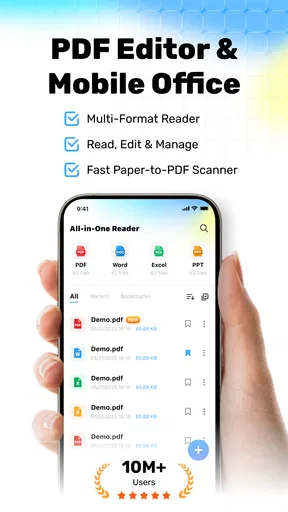
QuickDoc: PDF Reader Tools is designed for opening, reading, organizing, and managing PDF documents on a mobile device. After testing it, the app is most useful for people who regularly handle manuals, forms, study notes, receipts, or work documents. Depending on the version available on your device, it may also include practical tools for searching text, sharing files, adjusting the reading view, and performing basic PDF-related actions.
Can QuickDoc open and read different PDF files reliably?
QuickDoc is primarily intended to provide a convenient way to view PDF files stored on your phone or accessed through supported file locations. In everyday use, it offers a straightforward reading experience with familiar controls such as page navigation, zooming, and document browsing. However, unusually large, damaged, password-protected, or highly complex PDFs may behave differently, so users should test important documents before relying on the app exclusively.
Does QuickDoc: PDF Reader Tools include editing or PDF management features?
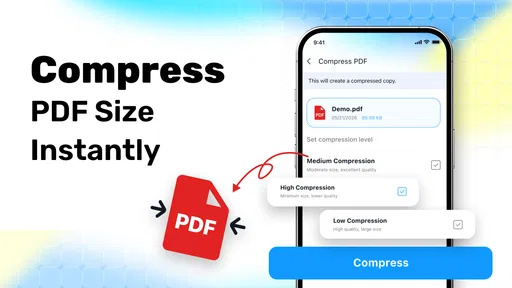
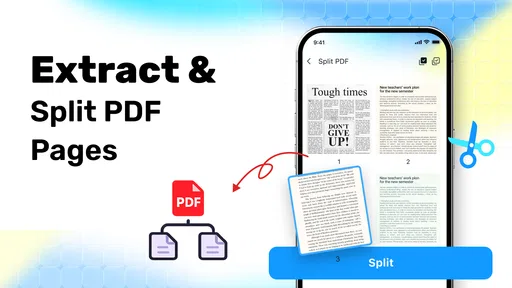
The app is more than a basic PDF viewer, as its toolset may include functions for organizing documents and carrying out common PDF tasks. Available options can vary according to the app version, device, and subscription status. Before downloading, users should check the current feature list carefully if they need advanced editing, file conversion, annotation, signing, compression, or page rearrangement, because not every tool may be available for free.
Is QuickDoc free to download, and are there advertisements or in-app purchases?
QuickDoc may be available as a free download, but free access does not necessarily mean every feature is included without limitations. Some tools can be supported by advertisements, premium upgrades, subscriptions, or one-time purchases. I recommend reviewing the pricing information shown in the Google Play Store or Apple App Store before installing, especially if you plan to use advanced PDF functions regularly or want an ad-free experience.
Is QuickDoc safe for private or confidential PDF documents?
QuickDoc should be downloaded only from the official Google Play Store or Apple App Store, and users should review the permissions and privacy information before importing sensitive files. Avoid assuming that every PDF is processed entirely offline unless the developer clearly confirms it. For medical, financial, legal, or work documents, check the app’s privacy policy, limit unnecessary permissions, and consider using password protection or a trusted offline reader when confidentiality is essential.
